Domain Portal

  • Subscribe to our RSS feed.
  • Twitter
  • StumbleUpon
  • Reddit
  • Facebook
  • Digg

Sunday, 25 March 2007

Reusability in Oracle ADF Business Components

Posted on 01:07 by Unknown
In Oracle ADF it is possible to create libraries for common solutions, and to reuse them later in several projects. This gives more productivity, project developer doesn't need to start from nothing - he will have working solutions at hand. If you would like to do this, there are instructions available in Oracle ADF Developer's Guide For Forms/4GL Developers - 25.7 Working with Libraries of Reusable Business Components.

There is nothing special when creating reusable library. In fact, you will need just to create specific deployment profile - Business Components Archive. This profile is used to create two JAR files - *CSMT.jar and *CSCommon.jar, which should be included into other projects. When reusing created library, developer will need to import those JAR files - instructions are available in Oracle ADF Developer's Guide (see above). After that, when library will be successfully imported, it will be possible to use provided components in Oracle ADF Business Components wizards.

Developed sample application is divided into two parts - CountriesReusableLibrary.zip and RegionsCountries.zip. In first part reusable library is implemented, it comes under lt.andrejusb.model.reusable package - Entity and View object for COUNTRIES table from standard HR schema are created. Implemented reusable library contains deployment profile. Second part implements support for REGIONS table and reuse developed library.

Sample application page flow logic:


Locally implemented Regions functionality:


Show countries button invokes imported functionality. Countries for selected region are displayed in the table:
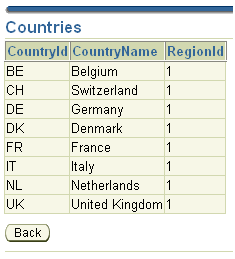

Functionality in View layer is implemented in common way, it doesn't depend on reusability we have used. For 'Show countries' af:commandButton is created af:setActionListener, that stores selected #{row.RegionId} value into #{processScope.regionId}. Data for table contained in countries.jspx page comes from imported component, this table depends on selected #{row.RegionId}. Dependency is implemented using ExecuteWithParams action and setRegionId invoke action.

ExecuteWithParams definition in countries.jspx page definition file:


setRegionId invoke action definition:


So, reusability in Oracle ADF Business Components can be achieved really easy - this may help to develop your projects more effectively.

When running sample application, don't forget to add adf-faces-impl.jar and jsf-impl.jar to application's WEB-INF\lib directory.
Read More
Posted in ADF | No comments

Sunday, 18 March 2007

Inheritance in Oracle ADF Business Components

Posted on 04:08 by Unknown
If necessary, in Oracle ADF Business Components it is possible to use inheritance. Inheritance is especially useful when iterative approach for project implementation is used and requirements aren't stable. For example, let's say primary requirement was to display records for all employees. Later, analyst has asked to implement functionality of filtering employees by salary value. In this case, instead of creating completely new two additional View objects, you can extend existent View object. More information on this topic you can find in Oracle ADF Developer's Guide For Forms/4GL Developers - 25.9 Creating Extended Components Using Inheritance.

I have created sample application - BC_Inheritance.zip, which shows how you can use inheritance with your business components. For the data source is used EMPLOYEES table from standard HR schema. The logic is the same as I have described it above - there is base View object and two extended. Business Components diagram for this sample:


EmployeesHighSalaryView retrieves records from database with salary value greater than entered, and EmployeesLowSalaryView with lower. Both of those View objects differs from their base View object by query Where clause.

How you can create extended View objects? There is nothing simpler - just use Oracle JDeveloper wizard. You should open Create View Object dialog and in the first step specify base View object you want to extend:


Other steps are the same as for usual View object.

In Presentation layer, View objects extended from base View object are used in similar way as usual View objects. In this sample I have added to the Data Model only extended View Objects, without base object. Data control looks like:


Sample application logic - user enters salary value and submits it by pressing Show button. When button is pressed, the same value is passed to both extended View objects. First View object shows employees with salary higher than entered and second View object with lower. This screen shows how it looks in practice:


When running sample application, don't forget to add adf-faces-impl.jar and jsf-impl.jar to application's WEB-INF\lib directory.
Read More
Posted in ADF | No comments

Saturday, 10 March 2007

Trip to Finland capital - Helsinki

Posted on 09:48 by Unknown
During this week I was in Helsinki, Finland. City have seen to me very practical, with well developed infrastructure for public sector. I mean, that it seems there is no problems with hotels, restaurants, transport and other services. It's not very cold in Helsinki now, only -4..0 °C, and almost no snow. In the city center they have trams, with advertisements - 'FEEL California, TASTE California', this looks quite interesting in cold Finland ;-)


Architectural style of the city center - broad roads, high buildings, big squares:


It is possible, that there is no terrible traffic jams in the city, because Helsinki have a subway. However, at 8:30 PM subway station hall was quite empty - only one person:


I have noticed, that in Helsinki, Russian culture presence is strong. It feels everywhere - architecture, street names and even souvenirs ;-). Russian souvenirs in Helsinki:


There is Russian culture presence in Helsinki, because Finland was a Grand Duchy of Russia (1809-1917). However, there was The Language Decree issued in 1863 by the Emperor of the Russian Empire Alexander II. It was the beginning of the process through which Finnish became an official administrative language equal to Swedish. In the Senate Square in Helsinki there is the monument to Alexander II "The Liberator":


The same monument, from closer look:


I hope, provided information will be useful, if you will be planning a trip to Helsinki.
Read More
Posted in Traveling | No comments

Sunday, 4 March 2007

Many-to-Many mapping in Oracle TopLink

Posted on 04:54 by Unknown
This kind of mapping in relational world is constructed using three tables. However, in object world only two classes are used for many-to-many. I have developed sample application - TopLinkMM.zip, that shows how many-to-many is supported in Oracle TopLink. For this sample I'm using Readers/Blogs mapping - one reader can read many blogs and one blog can be read by many readers.


SQL scripts for database schema are available in sample application lt.andrejusb.utils package under Model project.

Many-to-many mapping in Oracle TopLink is enabled by adding attribute with ValueHolderInterface type and corresponding accessors to the one of two classes involved into relationship. In developed sample I have added ValueHolderInterface type attribute - blogs, into Reader class. When accessors are created, it's time to enable many-to-many mapping using Oracle TopLink wizard in JDeveloper. To do this expand descriptor for Reader and double-click blogs element, this element is unmapped. When wizard dialog will be opened, set values for Reference Descriptor and Relation Table. Also, select - Private Owned and choose source and target references. General tab in mapping wizard should look like this:


If many-to-many will be successfully configured, JDeveloper will show appropriate icon for blogs attribue:


So, mapping is enabled, now we can test it. I have developed JUnit test suite, where insert and select is performed. Many-to-many test method code:


JUnit shows green light - there is no errors:

Read More
Posted in TopLink | No comments

Saturday, 24 February 2007

Oracle Object Types in Oracle ADF

Posted on 01:27 by Unknown
While browsing through OTN JDeveloper forum, I have found a question about how to use Oracle Spatial MDSYS.SDO_GEOMETRY object type with ADF BC. MDSYS.SDO_GEOMETRY object type is described in Oracle Spatial documentation - SDO_GEOMETRY Object Type. So, I have tried to implement support for it in ADF BC using ADF BC Domains - Creating Domains for Oracle Object Types When Useful. It seems, there is enough to generate Entity object from database table - ADF BC domains for spatial column are generated automatically.

I have developed sample application, that shows how to use MDSYS.SDO_GEOMETRY object type in ADF BC applications - ObjectTypeDomain.zip. However, all principles described in this sample, can be applied when using other Oracle Object Types in your applications. Developed sample use standard MVDEMO schema CITIES table, this schema can be downloaded from - Oracle MapViewer Demo Data Set. Model layer is developed using ADF Business Components, in View layer ADF Faces components are used.

When Entity object for CITIES table is created, type for spatial column is generated - SdoGeometry domain. Additionally, SdoPointType domain is generated. SdoPointType is a subdomain for SdoGeometry.


If we will look deeper, and review Java classes generated by Oracle ADF Business Components Design Time, we could find initStructureDef() method in both - SdoGeometry.java and SdoPointType.java. Code in this method represent object type structure. initStructureDef() method code for SdoGeometry domain:


initStructureDef() method code for SdoPointType domain:


There is no any modifications in ADF BC View object and Application Module, everything is created using default properties.

Ok, now we can switch to the View layer and review how users can edit and update data represented by ADF BC domains. Let's start from Data Control Palette - MDSYS.SDO_GEOMETRY object type is included into Data Control, we can explore and use it. Data Control with domain for object type looks like:


Developed sample application contains two pages - cities.jspx and sdoPointEdit.jspx. First page displays attribute cities data, in sdoPointEdit.jspx spatial data for selected city can be updated. Cities table content:


Let's select San Diego city and press 'Edit Geometry' button. Edit form for spatial information (X, Y) is displayed:


For example, we can change Y value to 33.815 and update SanDiego city geographical location ;-).


Ok, how to be sure, and check that spatial data is really updated. I think, we can use good old SQL*Plus and execute a query - 'SELECT C.LOCATION.SDO_POINT.Y FROM CITIES C WHERE C.RANK90 = 6', on CITIES table. Returned result is as we have expected: 33.815. So, operations on Oracle Object Types in ADF BC application can be implemented really easy. SQL*Plus shell window:

Read More
Posted in ADF, Spatial | No comments

Saturday, 17 February 2007

Multi-selection feature and ADF Faces af:table component

Posted on 02:49 by Unknown
In this post I will describe how to use multi-selection feature in ADF Faces. First of all I should say - multi-selection feature is fully supported by ADF Faces af:table component. However, those who are trying to use this feature for the first time, may have different opinion. You may ask - why? Simply, because multi-selection table by default may have one unneeded property, and this property is a source of a problem for those who are trying to use multi-selection. Which property is unneeded? Ok, let's look deeper and imagine that it is our first time when we are enabling multi-selection table and we have not used it before. One of the possible ways to create multi-selection table is:
  1. Drag and drop method return from Data Control Pallete in JDeveloper, and from pop-up window choose to create ADF Read-only Table. In my sample I'm using method return for Departments;

  2. In Edit Table Columns dialog select 'Enable selection' check-box. Press OK;
  3. Single-selection table in JSPX page is created;
  4. Using right mouse button, click on af:table element in Structure window and choose Properties;
  5. In Table Properties dialog select Formatting tab and instead 'Single Selection' choose 'Multiple Selection' for 'Include Selection Column' option. Press OK.
For af:table component, in JSPX should be generated by JDeveloper something like this:


Ok, there is enough only five steps, to create multi-selection table, let's test it. When table is opened, first row is selected by default. Hm..., it is like in single-selection table.


If you do not care about first row selected by default, let's randomly select any three rows and press Select button:


After Select button is pressed, only row for 'Human Resources' becomes selected:


So, it seems something is not ok. I have decided to research more deeper and have created 'Action Method Binding' for Select button in Backing bean. This method retrieves keys for the selected rows and prints information contained in those rows.


When selectButton_action() method was implemented, I have tested created multi-selection table for the second time. I have selected three rows and pressed Select button, in JDeveloper Log window was displayed only one row (should be three):

07/02/17 12:01:32 Selected Department: Human Resources

So, finally we have found a problem - multi-selection is enabled, but it works like a single-selection. How to solve this? Thanks God, it is simple - there is one property we should remove for af:table component:

selectionState=
"#{bindings.findAllDepartments1.collectionModel.selectedRow}"

Yes, selectionState set to 'selectedRow' is not needed in multi-selection table - remove it. When this property is removed, multi-selection feature works fine. Output in JDeveloper Log window, when three rows are selected:

07/02/17 12:09:39 Selected Department: Human Resources
07/02/17 12:09:39 Selected Department: IT
07/02/17 12:09:39 Selected Department: Executive

Download developed sample - MultiSelection.zip. Model layer for this sample is developed using Oracle TopLink, standard HR schema DEPARTMENTS table is used. View layer is implemented using Oracle ADF Faces. Sample contains one JSPX page - multiSelection.jspx, where described multi-selection table functionality is implemented.
Read More
Posted in ADF | No comments

Saturday, 10 February 2007

TopLink as a Content Repository for WebCenter Portlet

Posted on 05:51 by Unknown
Almost two weeks ago was released Oracle JDeveloper 10.1.3.2, and Oracle WebCenter Suite was included into this release. Main new feature - possibility of using portlets in JSF, all new features are described in this document - New in Oracle JDeveloper (10.1.3.2.0). I have decided to research more deeply functionality of WebCenter Suite and to build sample application based on acquired knowledge. There are very useful tutorials on OTN for this topic - Oracle WebCenter Suite Demos and Samples, and - Oracle WebCenter Framework Tutorial. However, I have not found an answer in those documents about how to use data from Model layer as a content repository for standard portlet. So, I have developed a sample - JSFPortletTopLink.zip.

It was interesting for me to create a content repository for portlet, based on Oracle TopLink object-relational mapping. Developed sample, demonstrates how to use standard portlets with TopLink and how to integrate portlets into ADF application. Sample contains two workspaces, this means that it is based on two independent samples - PortletProvider and PortletConsumer.


PortletProvider implements a portlet along with content repository. PortletConsumer consumes implemented portlet and provides additional logic. Both parts are based on standard HR schema and use TopLink in Model layer.

It is time to describe a business logic of developed application. There are two pages - viewJobs.jspx and editJob.jspx, first page is developed using ADF Faces components and displays a list of jobs, in the second page developed portlet is used. When a job is selected for editing, ADF Faces form is displayed, where job data can be updated. Additionally, a portlet is included into editJob.jspx, this portlet provides a list of employees assigned to the selected job.

In PortletProvider, I'm retrieving employees list by provided jobId, using TopLink Session query.


This method is called from portlet's view.jsp page. So, in such way it is possible to use as a content repository for portlet not only Web page, CSV file or RSS but also data stored in the database, through object-relational mapping.

PortletConsumer consumes deployed portlet and shows it in editJob.jspx. With WebCenter it becomes possible to use portlets in the same page where ADF Faces components are used and even enable communication between a portlet and ADF Faces component. Below I'm demonstrating how it looks in practice.

Let's say we want to edit job entry data for Programmer position:


When Edit button is clicked, selected row jobId attribute value is passed to edit page, where data for edit form and portlet is retrieved using supplied jobId. In editJob.jspx ADF Faces form component and portlet are used:


If we will select another job, for example - Finance Manager:


Then only one employee will be returned by portlet:

Read More
Posted in ADF, TopLink, WebCenter | No comments
Newer Posts Older Posts Home
Subscribe to: Posts (Atom)

Popular Posts

  • Groovy - Multiple LOV's per Attribute in JDeveloper 11g
    I was blogging previously about multiple LOV's per attribute functionality. I was using RowImpl class for View object in order to calcu...
  • External Transaction Service in Oracle TopLink
    I have developed sample application, in order to demonstrate how to use External Transaction Service (ETS), when Oracle TopLink is used in M...
  • Many-to-Many mapping in Oracle TopLink
    This kind of mapping in relational world is constructed using three tables. However, in object world only two classes are used for many-to-m...
  • Multi-selection feature and ADF Faces af:table component
    In this post I will describe how to use multi-selection feature in ADF Faces. First of all I should say - multi-selection feature is fully s...
  • Oracle JDeveloper/ADF Developers Wanted
    In my current Oracle JDeveloper/ADF project we are searching for additional developers. Project is based on Oracle Fusion 11g, so it can be ...
  • After UKOUG'08
    This week I was on UKOUG'08 conference. I really have enjoyed high quality of its content and I have learned new technical things about...
  • Oracle Spatial and Network Data Model
    During this week, a student from university where I'm achieving my master degree - Vincent, have asked me how to create SDO network dat...
  • Customizing Applications with MDS - Practical Overview
    During ODTUG Kaleidoscope 2008 , I was discussing with Shaun O'Brien (Principal Product Manager from Oracle Development Tools group) abo...
  • Hints for ADF 11g Application Credential and Policy Migration to Standalone WebLogic Servers
    Recently I was deploying our ADF 11g application on standalone WebLogic server. Deployment itself is straightforward, however it is little b...
  • Workaround for Null Value Bug in ADF List Of Values 11g
    Those of you, who are using List Of Values (LOV) component in ADF 11g, most probably already have noticed bug related to Null value. Simple ...

Categories

  • ADF
  • Apex
  • Apple
  • BPEL
  • Events
  • Forms
  • Groovy
  • JDeveloper 11g
  • Nomination
  • ODTUG Kaleidoscope
  • OFUG
  • Oracle Magazine
  • Oracle OpenWorld
  • Security
  • SOA
  • Spatial
  • TopLink
  • Traveling
  • Uncategorized
  • Vgo Software
  • Web Services
  • WebCenter
  • WebLogic
  • Workarounds

Blog Archive

  • ▼  2008 (72)
    • ▼  December (2)
      • Groovy - Multiple LOV's per Attribute in JDevelope...
      • After UKOUG'08
    • ►  November (3)
    • ►  October (9)
    • ►  September (4)
    • ►  August (9)
    • ►  July (6)
    • ►  June (10)
    • ►  May (4)
    • ►  April (5)
    • ►  March (7)
    • ►  February (5)
    • ►  January (8)
  • ►  2007 (65)
    • ►  December (6)
    • ►  November (7)
    • ►  October (6)
    • ►  September (4)
    • ►  August (3)
    • ►  July (4)
    • ►  June (6)
    • ►  May (5)
    • ►  April (6)
    • ►  March (4)
    • ►  February (5)
    • ►  January (9)
  • ►  2006 (9)
    • ►  December (9)
Powered by Blogger.

About Me

Unknown
View my complete profile