


Hey, my first application with JDeveloper 11g TP4 ! :-)
During this week I was working on business rules implementation design in my project. I got one really not usual business rule for UI, the thing is that client is Oracle Forms customer. So, in general this business rule was defined like - "When validation for particular field is failed, user must be not allowed to move to other fields". If you have noticed, in ADF Faces RC by default users are allowed to move focus to other fields and enter data, even if validation for some field is failed.
I was trying to use direct DOM manipulation to implement this rule, but without success. I have discussed this with Frank Nimphius (Principal Product Manager in Oracle) and he suggested working solution based on ADF Faces client framework. Actually I will document it in this blog post. Also you can read ADF Faces Rich Client - JavaScript Programming Nuggets page from Frank Nimphius blog.
I have implemented described business rule in ComplexValidation.zip sample application. Mandatory validation rules are applied for 3 fields - Last Name, Email and Job. Field - Job, contains LOV component and is associated with description text field - Job Title. And finally, application contains one optional Number type field. Sample is based on HR schema.
As you have noticed, there are 3 cases for validation in developed application - Mandatory, Mandatory LOV and Number type. You can easily implement your own rules, if will follow described techniques. Let's describe complex validation implementation steps for all 3 cases.
JavaScript code in all three cases will be written in af:group section created in af:document metaContainer facet:

1. Mandatory field
Rule description: When value is set to NULL and Tab button is pressed or mouse cursor is moved, focus must be returned back to Mandatory field where validation fails. To lock focus, JavaScript function is used, where ADF Faces client framework method is invoked:

Logically thinking, this function must be invoked when user is trying to move focus from current field with failed validation. With ADF Faces RC you can use af:clientListener operation component.

This component allows to invoke JavaScript function based on event. In our case, JavaScript function will be invoked when component loses focus - on blur:

At runtime, if value for mandatory Last Name field is removed:

Focus will be locked for Last Name field:

User will not be able to change values in other fields or press any buttons available on the page. The same applies for Email field.
2. Mandatory LOV field
Rule description: When value is set to NULL and Tab button is pressed or mouse cursor is moved, focus must be returned back to Mandatory LOV field where validation fails. Description text field associated with LOV field must be cleared, when validation in LOV field fails. In this case, I have used af:serverListener operation component additionally:

af:clientListener is defined similar like in previous case:

For af:serverListener I have provided its name in Type field and have specified method name from Backing bean. handlerMethod() is a Java method and this method will be invoked from JavaScript function in order to set empty value for description text field:

JavaScript function code:

Java method code:

Value of description text field in this sample application is binded to a method in backing bean:

Method in Backing bean provides value for description text field according to a value set from handlerMethod():

At runtime, when user clears value in mandatory LOV field:
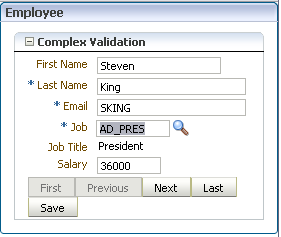
Focus will be locked for this mandatory LOV field and associated description text field will be cleared. And of course, validation error message is displayed:

If you don't know already, nice feature of LOV component is that LOV window is opening automatically when wrong value is entered and Tab button is pressed (when AutoSubmit=True):

Tab button is pressed and LOV window is opened, since non existing value was entered originally:

When correct value is selected, associated description text field is refreshed again and user can move focus to other fields:

3. Number type field
Rule description: Focus is locked, when invalid value is entered. This rule is implemented in similar way as a rule in first case. JavaScript function is different:

When wrong value is entered, focus is locked again and validation error message is shown:

During this week I was working on business rules implementation design in my project. I got one really not usual business rule for UI, the thing is that client is Oracle Forms customer. So, in general this business rule was defined like - "When validation for particular field is failed, user must be not allowed to move to other fields". If you have noticed, in ADF Faces RC by default users are allowed to move focus to other fields and enter data, even if validation for some field is failed.
I was trying to use direct DOM manipulation to implement this rule, but without success. I have discussed this with Frank Nimphius (Principal Product Manager in Oracle) and he suggested working solution based on ADF Faces client framework. Actually I will document it in this blog post. Also you can read ADF Faces Rich Client - JavaScript Programming Nuggets page from Frank Nimphius blog.
I have implemented described business rule in ComplexValidation.zip sample application. Mandatory validation rules are applied for 3 fields - Last Name, Email and Job. Field - Job, contains LOV component and is associated with description text field - Job Title. And finally, application contains one optional Number type field. Sample is based on HR schema.
As you have noticed, there are 3 cases for validation in developed application - Mandatory, Mandatory LOV and Number type. You can easily implement your own rules, if will follow described techniques. Let's describe complex validation implementation steps for all 3 cases.
JavaScript code in all three cases will be written in af:group section created in af:document metaContainer facet:

1. Mandatory field
Rule description: When value is set to NULL and Tab button is pressed or mouse cursor is moved, focus must be returned back to Mandatory field where validation fails. To lock focus, JavaScript function is used, where ADF Faces client framework method is invoked:

Logically thinking, this function must be invoked when user is trying to move focus from current field with failed validation. With ADF Faces RC you can use af:clientListener operation component.

This component allows to invoke JavaScript function based on event. In our case, JavaScript function will be invoked when component loses focus - on blur:

At runtime, if value for mandatory Last Name field is removed:

Focus will be locked for Last Name field:

User will not be able to change values in other fields or press any buttons available on the page. The same applies for Email field.
2. Mandatory LOV field
Rule description: When value is set to NULL and Tab button is pressed or mouse cursor is moved, focus must be returned back to Mandatory LOV field where validation fails. Description text field associated with LOV field must be cleared, when validation in LOV field fails. In this case, I have used af:serverListener operation component additionally:

af:clientListener is defined similar like in previous case:

For af:serverListener I have provided its name in Type field and have specified method name from Backing bean. handlerMethod() is a Java method and this method will be invoked from JavaScript function in order to set empty value for description text field:

JavaScript function code:

Java method code:

Value of description text field in this sample application is binded to a method in backing bean:

Method in Backing bean provides value for description text field according to a value set from handlerMethod():

At runtime, when user clears value in mandatory LOV field:

Focus will be locked for this mandatory LOV field and associated description text field will be cleared. And of course, validation error message is displayed:

If you don't know already, nice feature of LOV component is that LOV window is opening automatically when wrong value is entered and Tab button is pressed (when AutoSubmit=True):

Tab button is pressed and LOV window is opened, since non existing value was entered originally:

When correct value is selected, associated description text field is refreshed again and user can move focus to other fields:

3. Number type field
Rule description: Focus is locked, when invalid value is entered. This rule is implemented in similar way as a rule in first case. JavaScript function is different:

When wrong value is entered, focus is locked again and validation error message is shown:


